

Welcome to Vix.cpp
Vix.cpp is a modern C++ runtime and developer toolkit for building native applications with a clearer development workflow.
A Vix.cpp project is still a normal C++ project. The source files are written in C++, the compiler is a C++ compiler, and the result is a native executable or library. Vix.cpp improves the work around the application: creating projects, running files, building, testing, checking, formatting, installing SDK profiles, managing packages, reading diagnostics, and preparing software for production.
Current version: v2.7.0
The fastest way to try Vix.cpp is to run a single C++ file:
vix run main.cppWhen the code grows into a project, the workflow stays familiar:
vix new api
cd api
vix devThis Getting Started section is written for learning. It starts with the basic workflow, then moves step by step toward a real C++ application.
Learn with Vix Note
Vix Note is part of the Vix.cpp developer experience. It gives you a visual space for executable notes, examples, small experiments, and diagnostics while still using the normal Vix workflow underneath.
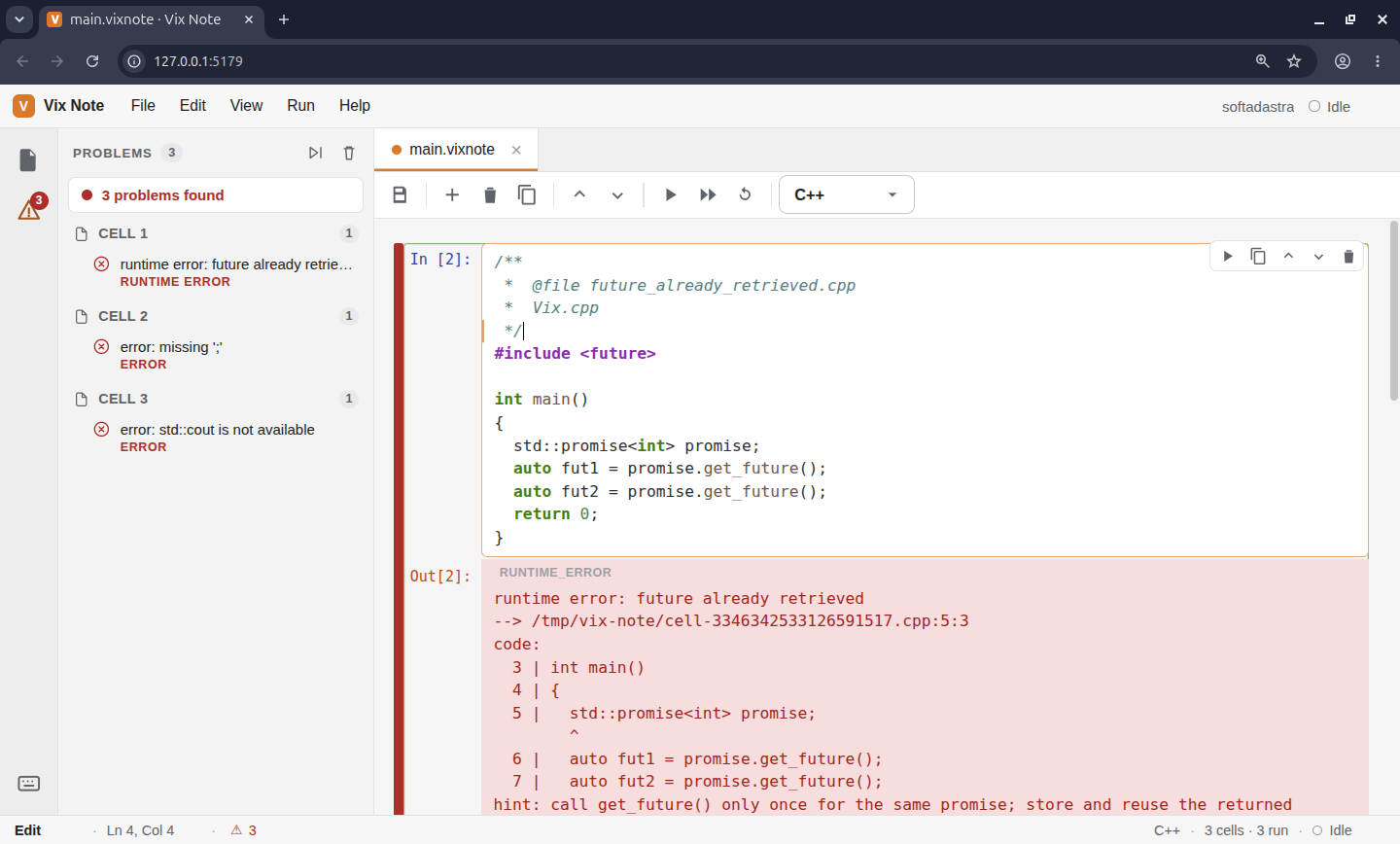
Start it with:
vix noteUse Vix Note when you want to learn by writing small examples, keeping notes close to the code, testing ideas before moving them into a project, or explaining a C++ workflow in a way that remains executable.
Documentation is easier to understand when the examples are not separated from the workflow. Vix Note exists for that reason: it gives learning, experimentation, and diagnostics a visible place inside the Vix.cpp development experience.
Install Vix.cpp
Starting with Vix.cpp v2.7.0, installation is split into two steps.
First, install the CLI.
Linux and macOS:
curl -fsSL https://vixcpp.com/install.sh | bashWindows PowerShell:
irm https://vixcpp.com/install.ps1 | iexThen inspect and install the SDK profile required by the kind of application you are building:
vix upgrade --sdk list
vix upgrade --sdk info web
vix upgrade --sdk webThe CLI is the bootstrap. SDK profiles provide the native development layer used by Vix.cpp projects.
This split keeps the first installation smaller and avoids forcing optional runtime dependencies on every user.
What Vix.cpp is for
C++ already gives developers performance, control, portability, mature compilers, and native binaries. The difficult part is often the distance between a source file and a complete application.
A real C++ application usually needs project structure, build configuration, dependency setup, runtime commands, tests, formatting, logs, diagnostics, packaging, installation paths, and production behavior. These pieces are often assembled manually with CMake files, shell scripts, package tools, CI configuration, and project-specific conventions.
Vix.cpp brings the common parts of that workflow into one application-oriented toolchain.
C++ source code
  -> Vix.cpp workflow
-> native executable or libraryThe result is still native C++. Vix.cpp gives the application a clearer path from development to production.
How Vix.cpp fits into the C++ ecosystem
Vix.cpp works with the native C++ toolchain.
For projects that already have a CMakeLists.txt, Vix.cpp can use the existing CMake project. For simpler projects, Vix.cpp can use a vix.app manifest and generate the internal CMake project needed to build the application.
Existing CMake project:
  CMakeLists.txt -> Vix workflow -> build and run

Simple Vix project:
vix.app -> generated CMake -> build and runThis gives small projects a faster start while keeping a path open for larger projects that need full CMake control.
The learning path
Read the Getting Started pages in order:
- What is Vix.cpp?
- Installation
- Set Up Your Environment
- Run Your First C++ File
- Create Your First Project
- Your First HTTP Server
The first goal is not to learn every module. The first goal is to understand the workflow:
install -> verify -> run one file -> create a project -> start a serverOnce that workflow is clear, the rest of the documentation becomes easier to follow.
Run one C++ file
Create main.cpp:
#include <vix.hpp>

int main()
{
  vix::print("Hello from Vix.cpp");
  return 0;
}Run it:
vix run main.cppThis is the smallest useful Vix.cpp workflow. It lets you test a C++ file without creating a full project first.
Create a project
Create a new project:
vix new api
cd apiStart development mode:
vix devBuild it:
vix buildRun it:
vix runRun checks and tests:
vix check
vix testsFormat the source files:
vix fmtThe same command surface follows the project as it grows.
SDK profiles
SDK profiles let Vix.cpp install by application domain.
A small CLI tool, a web backend, a data-backed service, a desktop shell, a P2P application, and a game-oriented project do not need the same development layer. Vix.cpp v2.7.0 makes that separation explicit.
Common profiles include:
Inspect before installing:
vix upgrade --sdk info webInstall the profile you need:
vix upgrade --sdk webUse all only when the machine really needs the full SDK surface.
What you can build
With Vix.cpp, you can build backend services, HTTP APIs, WebSocket applications, command-line tools, reusable C++ libraries, template-based applications, database-backed systems, desktop shell applications, P2P systems, local-first systems, and production services.
Different project types can use different SDK profiles and modules, but the daily workflow remains familiar.
A backend service may use HTTP, JSON, validation, middleware, logging, database access, and tests. A CLI tool may use filesystem utilities, process handling, formatted output, packaging, and diagnostics. A local-first application may use storage, sync, caching, P2P, and reliability-oriented modules.
The detailed module reference belongs in the module documentation. The important idea here is that Vix.cpp is organized around application workflow, not around a long list of disconnected features.
Getting Started vs The Vix Book
Getting Started is practical. It is the shortest path from a fresh install to a running Vix.cpp application.
The Vix Book goes deeper. It explains the mental model behind Vix.cpp, then covers application structure, routes, requests, responses, JSON APIs, middleware, validation, database access, WebSocket, async runtime, cache, sync, P2P, and production deployment.
Start here if you want to run something quickly. Continue with the book when you want to understand the design and build larger applications.
What you need to know first
You only need basic C++ knowledge to begin:
- functions
- headers
std::string- lambdas
- basic terminal usage
You do not need to be a CMake expert to start.
Vix.cpp can create a project, build it, run it, test it, format it, check it, and give you a clean development loop. CMake remains available when the project needs deeper build control.
Projects around Vix.cpp
Rix
Rix is the unified userland library layer for Vix.cpp.
Vix provides the runtime, CLI, build workflow, registry integration, SDK profiles, and core foundations. Rix provides optional userland packages and a cleaner facade for application-level libraries.
Pico
Pico is a real application built with Vix.cpp.
It exists to keep the runtime honest by validating Vix.cpp inside a working application, where routing, middleware, persistence, diagnostics, runtime behavior, and developer workflow have to work together.
Cnerium
Cnerium is a reliability-first backend layer for Vix.
It belongs above the core runtime, where application reliability, backend structure, and production-oriented patterns can evolve without turning Vix itself into a large opinionated framework.
https://github.com/softadastra/cnerium
Kordex
Kordex is a JavaScript runtime for reliable local-first applications, built with Vix.cpp.
It shows how Vix can be used as the native foundation for higher-level runtimes and local-first application platforms.
https://github.com/softadastra/kordex
Offline PDF
You can download the complete Vix.cpp documentation as a PDF:
Links
- Website: https://vixcpp.com
- Documentation: https://docs.vixcpp.com
- Registry: https://registry.vixcpp.com
- Engineering notes: https://blog.vixcpp.com
- GitHub: https://github.com/vixcpp/vix
First command to remember
vix run main.cppThis is the fastest way to try Vix.cpp with a single C++ file.
When the code grows into an application, move to a project:
vix new api
cd api
vix devNext step
Understand the role of Vix.cpp in the C++ ecosystem.
Next: What is Vix.cpp?