
Model Providers
A model provider is the user-facing execution target in CodeAlta: it owns credentials, endpoint settings, model discovery, the selected model, reasoning effort, and optional context/compaction metadata.
The preferred workflow is the Model Providers dialog (Ctrl+G Ctrl+R). Advanced users can edit the same TOML file directly at ~/.alta/config.toml.
Use Test before saving provider changes. It catches missing credentials, unsupported models, endpoint mistakes, and login-flow issues before the provider becomes the active execution target.
Default configuration file
On first run, CodeAlta creates a default ~/.alta/config.toml with common providers disabled. Later launches leave your existing global config untouched, even when a newer CodeAlta version bundles additional default entries, so you can remove, rename, or customize providers without startup adding them back. Enable only the providers you want to use.
A separate [chat] section chooses the default enabled provider:
[chat]
default_provider = "openai"
Project-local overrides can live in <project>/.alta/config.toml. Project files currently override [chat].default_provider and each provider's selected model / reasoning_effort; global ~/.alta/config.toml still defines the provider registrations, credentials, endpoints, and advanced provider metadata.
Project-local provider preferences are useful for repository-specific defaults, but avoid committing secrets. Prefer api_key_env in the global provider definition so credentials stay in your user environment.
Provider dialog
Open the dialog with Ctrl+G Ctrl+R, /model_providers, or the provider summary in the footer. Use Refresh (or /model_providers_refresh) to reload the saved configuration from disk and retest provider availability, for example after starting a local LLM server that was offline earlier.
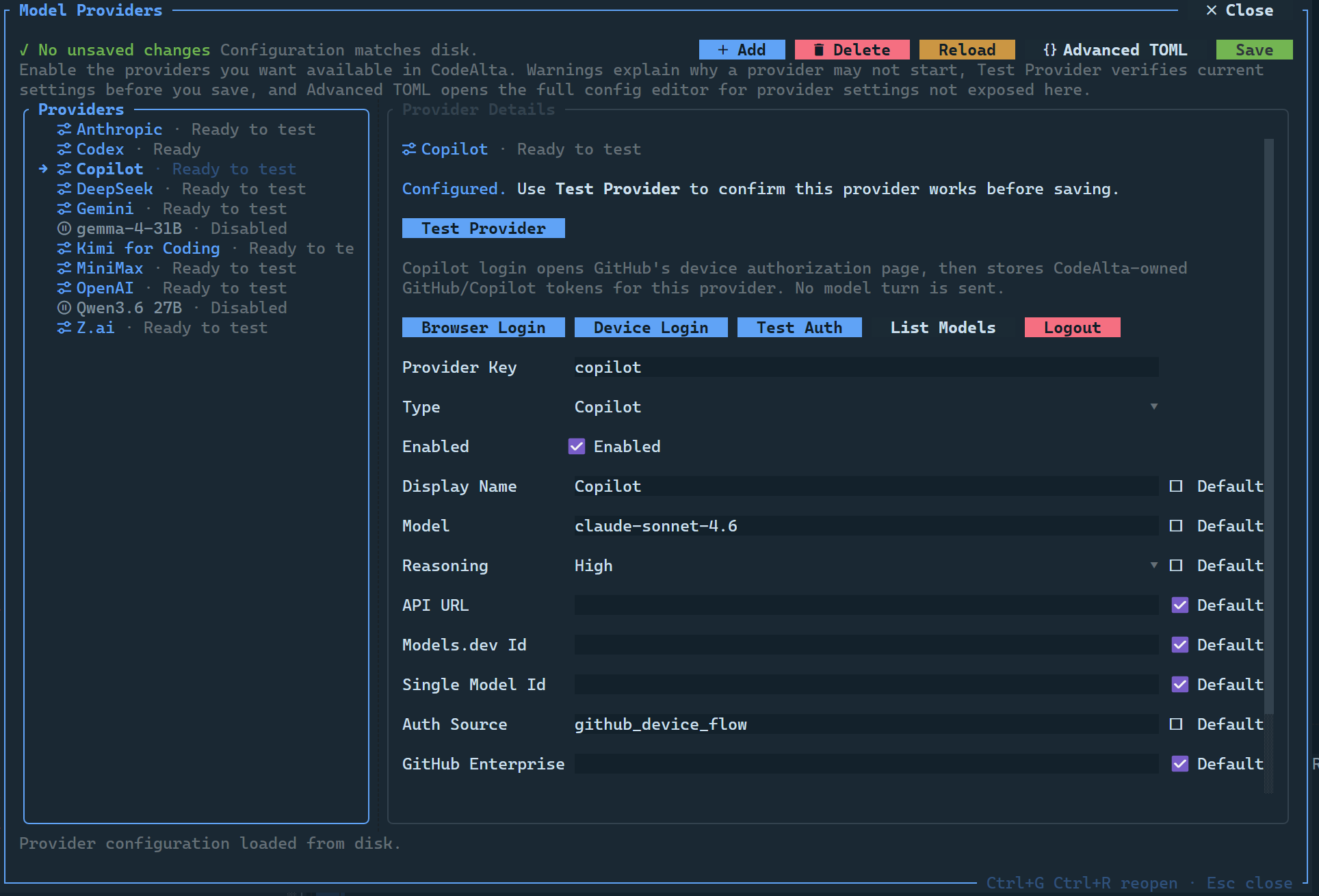
The dialog can:
- add, delete, enable, and disable provider entries;
- validate provider keys, endpoint URLs, required credentials, and conflicting settings;
- store an API key directly or refer to an environment variable;
- list and choose a provider model on demand when the Model field is not using its default;
- run provider tests before applying changes; a successful test automatically enables that provider;
- start and monitor Codex/Copilot browser or device login flows; successful login automatically enables that provider;
- refresh saved providers from disk and retest runtime availability without reopening the app;
- preserve advanced TOML settings such as
profile,compaction,extra_body,model_overrides, andprotocol_trace; - open an Advanced TOML editor with live validation.
Advanced TOML reference
Global provider entries live under [providers.<provider-key>]. Provider keys are normalized to lower case; codex and copilot also receive their default provider type when type is omitted. Supported canonical provider types are codex, copilot, xai, openai-chat, openai-responses, azure-openai, anthropic, google-genai, and vertex-ai.
Common provider fields are:
| Field | Purpose |
|---|---|
enabled |
Enables or disables the provider entry. Missing means enabled after normalization. |
display_name |
Label shown in provider selectors and dialogs. |
type |
Provider type. Common aliases such as openai, responses, aoai, gemini, vertex, and github-copilot are normalized to the canonical types above. |
model |
Default model id for this provider. |
reasoning_effort |
Default reasoning effort: none, minimal, low, medium, high, or xhigh. |
api_key / api_key_env |
Literal API key or environment variable name for API-key providers. Prefer api_key_env. |
api_url |
Absolute endpoint override. Azure OpenAI, Codex, and Copilot require HTTPS except localhost test transports. |
network_timeout_seconds |
Positive OpenAI/Azure SDK network timeout override for openai-chat, openai-responses, azure-openai, and codex. Leave unset for the OpenAI SDK default timeout of 100 seconds. |
protocol_trace |
Enables low-level protocol tracing for OpenAI, Codex, and Copilot transports. |
models_dev_provider_id |
Optional models.dev provider id used to enrich model metadata where supported. |
single_model_id |
Fixed model id for endpoints that do not expose a model list. |
profile |
Compatibility profile block; see below. |
compaction |
Local raw-API compaction settings; see Context usage and compaction. |
model_overrides |
Per-model metadata overrides; see Model metadata overrides. |
extra_body |
Additional OpenAI-compatible request-body TOML fields; only used by openai-chat and openai-responses. |
request |
Request-level headers and OpenAI-compatible body defaults; see Request customizations. |
model_request |
Per-model request overrides for OpenAI-compatible providers; see Model request overrides. |
Provider-type-specific fields and restrictions:
| Type | Credential and endpoint fields | Additional fields handled for that type |
|---|---|---|
openai-chat, openai-responses |
api_key or api_key_env; optional api_url, organization_id, project_id |
network_timeout_seconds, models_dev_provider_id, single_model_id, extra_body, request, model_request, profile, compaction, model_overrides, protocol_trace |
azure-openai |
api_key or api_key_env; required Azure OpenAI resource api_url |
network_timeout_seconds, models_dev_provider_id, single_model_id, profile, compaction, model_overrides, protocol_trace |
anthropic |
api_key or api_key_env; optional api_url |
models_dev_provider_id, single_model_id, request.headers, request.remove_headers, profile, compaction, model_overrides |
google-genai |
api_key or api_key_env; optional api_url |
models_dev_provider_id, single_model_id, request.headers, request.remove_headers, profile, compaction, model_overrides |
vertex-ai |
project and location are required when enabled; optional api_url |
models_dev_provider_id, single_model_id, request.headers, request.remove_headers, profile, compaction, model_overrides |
mistral |
api_key or api_key_env; optional api_url |
models_dev_provider_id, single_model_id, request.headers, request.remove_headers, profile, compaction, model_overrides |
codex |
ChatGPT/Codex OAuth state; no api_key or api_key_env; optional api_url |
network_timeout_seconds, auth_source, account_id, max_concurrent_requests, text_verbosity, include_encrypted_reasoning, model_discovery, response_transport, send_responses_beta_header, send_installation_id, installation_id_source, experimental, profile, compaction, protocol_trace |
copilot |
GitHub device flow by default; optional api_url |
auth_source, github_enterprise_url, github_token_env, copilot_token_env, model_discovery, enable_model_policies, include_preview_models, experimental, single_model_id, models_dev_provider_id, profile, compaction, model_overrides, protocol_trace |
xai |
xAI Grok OAuth (browser PKCE or device flow); optional api_url |
auth_source, model_discovery, single_model_id, models_dev_provider_id, request, model_request, profile, compaction, model_overrides, protocol_trace |
Codex accepts these values for constrained fields: auth_source = "codealta_oauth", "codex_auth_import", "codex_auth_file_readonly", or "external_token_command"; text_verbosity = "low", "medium", or "high"; model_discovery = "codex_endpoint_with_static_fallback", "codex_endpoint", or "static"; response_transport = "websocket_with_http_fallback" or "http"; and installation_id_source = "codealta_state", "codex_home_import", or "codex_home_readonly".
Copilot accepts auth_source = "github_device_flow", "github_token_env", or "copilot_token_env"; model_discovery = "copilot_endpoint_with_static_fallback", "copilot_endpoint", or "static". github_token_env is required when using GitHub-token auth, and copilot_token_env is required when using Copilot-token auth.
xAI Grok accepts auth_source = "xai_browser_oauth" or "xai_device_flow"; model_discovery = "xai_endpoint_with_static_fallback", "xai_endpoint", or "static". Both auth sources store CodeAlta-owned access and refresh tokens through the public Grok-CLI OAuth client and unlock SuperGrok / Grok Heavy plan access on accounts that have subscribed.
Compatibility profile
Use [providers.<provider-key>.profile] only when a provider-compatible endpoint needs behavior different from CodeAlta's default transport profile. The supported profile fields are:
| Field | Meaning |
|---|---|
supports_developer_role |
Whether requests may use a developer-role message. |
supports_store |
Whether the transport may use provider store/session flags where supported. |
supports_reasoning_effort |
Whether reasoning_effort can be sent to the provider. |
streams_usage |
Whether streamed responses include usage data. |
supports_thought_signatures |
Whether provider thought-signature continuity is supported. |
requires_tool_result_name |
Whether tool-result messages must include a tool name. |
requires_assistant_after_tool_result |
Whether a synthetic assistant turn must be inserted after tool results. |
supports_cache_control |
Whether cache-control metadata is supported. |
supports_strict_tools |
Whether strict tool schemas are supported. |
thinking_format |
Provider-specific thinking/reasoning format name. |
max_tokens_field_name |
Request-body field used for maximum output tokens, such as max_output_tokens or max_completion_tokens. |
reasoning_field_names |
Response fields inspected for reasoning content. |
reasoning_input_field_name |
Assistant-message field used when replaying prior reasoning content. |
supports_parallel_tool_calls |
Whether to send the Chat Completions parallel_tool_calls control when tools are available. |
The bundled Alibaba/DashScope and DeepSeek profiles are examples of verified compatibility overrides:
[providers.alibaba.profile]
supports_developer_role = false
supports_store = false
supports_reasoning_effort = false
max_tokens_field_name = "max_tokens"

[providers.alibaba.request.extra_body]
enable_thinking = true
preserve_thinking = true

[providers.deepseek.profile]
supports_developer_role = false
supports_store = false
max_tokens_field_name = "max_tokens"
reasoning_input_field_name = "reasoning_content"

[providers.deepseek.request.extra_body.thinking]
type = "enabled"
Single-model endpoints
Use single_model_id when a provider-compatible endpoint serves one model or cannot list models. The bundled MiniMax entry uses this pattern:
[providers.minimax]
single_model_id = "MiniMax-M2.7"
Request customizations
Use [providers.<provider-key>.request] for static request headers and OpenAI-compatible request-body fields. Existing top-level [providers.<provider-key>.extra_body] remains supported and takes precedence over [providers.<provider-key>.request.extra_body] for backward compatibility.
Merge order is predictable:
- generic transport behavior in code;
- bundled provider defaults from CodeAlta's copied provider-defaults content file;
- user
request.remove_headers/request.remove_extra_bodyremovals for inherited defaults; - user
request.headersandrequest.extra_body; - existing top-level
extra_bodyfor OpenAI-compatible providers; - provider-owned authentication headers, which cannot be removed or replaced by request config.
Header names such as Authorization, api-key, and x-api-key are reserved for provider authentication. Protocol traces redact common secret-bearing header names (Authorization, *-key, *token*, *secret*, and related names).
[providers.openrouter]
type = "openai-responses"
api_key_env = "CODEALTA_OPENROUTER_API_KEY"
api_url = "https://openrouter.ai/api/v1"

[providers.openrouter.request.headers]
HTTP-Referer = "https://codealta.dev"
X-Title = "CodeAlta"

[providers.openrouter.request.extra_body]
include_usage = true

[providers.openrouter.request]
remove_headers = ["X-Unwanted-Default"]
remove_extra_body = ["unsupported_default"]
Alibaba/DashScope-style OpenAI-compatible endpoints can use request body defaults without replacing older extra_body configs:
[providers.alibaba]
type = "openai-chat"
api_key_env = "CODEALTA_ALIBABA_API_KEY"
api_url = "https://dashscope-intl.aliyuncs.com/compatible-mode/v1"

[providers.alibaba.request.extra_body]
enable_search = false
Alibaba/DashScope, MiniMax, and DeepSeek compatibility defaults are bundled in CodeAlta's provider-defaults content file. You usually do not need to restate them in config.toml; explicit profile, request, and extra_body values still win when you do. The Alibaba defaults request streaming usage with stream_options = { include_usage = true } and enable Alibaba thinking plus thinking replay with enable_thinking = true and preserve_thinking = true for the Chat Completions transport.
DeepSeek defaults also avoid the non-standard developer role and store parameter, use max_tokens, send DeepSeek's documented thinking = { type = "enabled" } request control by default, and preserve reasoning_content on replayed assistant messages; reasoning_effort remains available where supported.
Model request overrides
Use [providers.<provider-key>.model_request.<model-id>] to apply request mutations only when a matching model is selected. This is separate from model_overrides, which changes only metadata used by selectors and token budgeting. Matching uses the same exact/normalized/date-suffix model-id behavior as metadata overrides.
[providers.openai.model_request."gpt-5.5"]
remove_extra_body = ["reasoning_split"]

[providers.openai.model_request."gpt-5.5".extra_body]
reasoning = { effort = "high" }

[providers.openai.model_request."gpt-5.5".headers]
X-Model-Mode = "high-reasoning"
Model metadata overrides
Use [providers.<provider-key>.model_overrides.<model-id>] to correct model metadata used by the model browser, selectors, usage denominator, and compaction budget when discovery or models.dev metadata is missing or incomplete.
| Field | Effect |
|---|---|
display_name |
Overrides the model label. |
description |
Overrides the model description. |
context_window |
Total context-window tokens. Also writes contextWindow / contextWindowTokens capabilities. |
input_token_limit |
Maximum input tokens. Also writes inputTokenLimit / maxInputTokens capabilities. |
output_token_limit |
Maximum output tokens. Also writes outputTokenLimit. |
max_tokens |
Maximum output token field used as maxTokens; defaults to output_token_limit when omitted. |
supports_reasoning |
Overrides reasoning capability. |
supports_tool_call |
Overrides tool-call capability. |
supports_attachments |
Overrides attachment/image capability. |
supports_structured_output |
Overrides structured-output capability. |
For a model id that contains dots, slashes, or other TOML punctuation, quote the key:
[providers.openai.model_overrides."your-model-id"]
context_window = 200000
input_token_limit = 180000
output_token_limit = 20000
supports_reasoning = true
supports_tool_call = true
Popular providers
OpenAI platform
Use the Responses API provider for current OpenAI platform models:
[providers.openai]
enabled = true
display_name = "OpenAI"
type = "openai-responses"
model = "gpt-5.5"
reasoning_effort = "high"
api_key_env = "CODEALTA_OPENAI_API_KEY"
api_url = "https://api.openai.com/v1"
Use openai-chat for OpenAI-compatible Chat Completions endpoints.
Alibaba Cloud Model Studio
Alibaba Cloud Model Studio exposes an OpenAI-compatible Chat API that works with CodeAlta's openai-chat provider type:
[providers.alibaba]
enabled = true
display_name = "Alibaba"
type = "openai-chat"
model = "qwen3.7-max"
api_key_env = "CODEALTA_ALIBABA_API_KEY"
api_url = "https://dashscope-intl.aliyuncs.com/compatible-mode/v1"
CodeAlta's bundled Alibaba/DashScope defaults follow the OpenAI Chat API documentation: system messages are used instead of developer messages, store is not sent, maximum output tokens use max_tokens, OpenAI-style reasoning_effort is not sent, streaming requests ask for the final usage chunk with stream_options.include_usage = true, and Alibaba's non-standard enable_thinking = true and preserve_thinking = true controls are sent through extra_body by default. Override either value under request.extra_body, legacy extra_body, or a model-specific model_request entry, or list it in request.remove_extra_body when an endpoint rejects it. Other Alibaba-specific parameters such as thinking_budget, top_k, enable_search, and search_options remain opt-in via request.extra_body or extra_body because their support varies by model and mode. CodeAlta keeps the OpenAI-compatible Chat default of sending parallel_tool_calls when tools are available; set profile.supports_parallel_tool_calls = false only for endpoints or models that reject that parameter.
Azure OpenAI
Use azure-openai for Azure OpenAI resource endpoints. The Azure OpenAI SDK uses deployment names where OpenAI APIs use model ids, so set model and/or single_model_id to your deployment name:
[providers.azure-openai]
enabled = true
display_name = "Azure OpenAI"
type = "azure-openai"
model = "my-gpt-4o-mini-deployment"
api_key_env = "CODEALTA_AZURE_OPENAI_API_KEY"
api_url = "https://your-resource.openai.azure.com"
network_timeout_seconds = 180
Use network_timeout_seconds when long Azure OpenAI or OpenAI-compatible streaming requests otherwise fail with the SDK's default network timeout.
Azure OpenAI does not expose model listing through the SDK used by CodeAlta. If single_model_id is not set, CodeAlta uses model as the single deployment shown in model selectors.
Anthropic
[providers.anthropic]
enabled = true
display_name = "Anthropic"
type = "anthropic"
model = "claude-sonnet-4-6"
api_key_env = "CODEALTA_ANTHROPIC_API_KEY"
Anthropic-compatible providers can use the same type with a custom api_url and, when needed, single_model_id.
Gemini / Google GenAI
Use google-genai for the Gemini API with an API key. Leave model unset
to choose from provider-discovered Gemini models, or set it explicitly:
[providers.gemini]
enabled = true
display_name = "Gemini"
type = "google-genai"
api_key_env = "CODEALTA_GEMINI_API_KEY"
model = "gemini-2.5-pro"
Vertex AI
Vertex uses a Google Cloud project and location instead of an API-key endpoint:
[providers.vertex]
enabled = true
display_name = "Vertex"
type = "vertex-ai"
project = "my-gcp-project"
location = "europe-west4"
models_dev_provider_id = "google"
model = "gemini-2.5-pro"
reasoning_effort = "high"
Mistral
Use mistral for the Mistral chat-completions API. CodeAlta streams turns over Mistral's /v1/chat/completions endpoint, serializes user/assistant/tool roles directly, maps streamed tool-call fragments back into CodeAlta tool calls, and uses the Mistral SDK for model listing.
[providers.mistral]
enabled = true
display_name = "Mistral"
type = "mistral"
api_key_env = "CODEALTA_MISTRAL_API_KEY"
model = "mistral-small-latest"
models_dev_provider_id = "mistral"
Codex subscription endpoint
The codex provider type is ChatGPT/Codex subscription endpoint access. It is intentionally distinct from OpenAI platform API keys.
[providers.codex]
enabled = true
display_name = "Codex"
type = "codex"
model = "gpt-5.5"
reasoning_effort = "high"
Codex credentials are stored in CodeAlta-owned state through its login flow. It does not accept api_key, api_key_env, or arbitrary extra_body.
Copilot
[providers.copilot]
enabled = true
display_name = "Copilot"
type = "copilot"
model = "claude-sonnet-4.6"
reasoning_effort = "high"
auth_source = "github_device_flow"
model_discovery = "copilot_endpoint_with_static_fallback"
For non-interactive environments, the dialog and TOML support GitHub-token or Copilot-token environment-variable modes.
xAI Grok
The xai provider type talks to the xAI API at https://api.x.ai/v1. Both auth flows persist CodeAlta-owned access and refresh tokens against the public Grok-CLI OAuth client and unlock SuperGrok / Grok Heavy plan access on accounts that have subscribed.
[providers.xai]
enabled = true
display_name = "xAI Grok"
type = "xai"
model = "grok-4.3"
reasoning_effort = "high"
auth_source = "xai_browser_oauth"
model_discovery = "xai_endpoint_with_static_fallback"
Two auth flows are supported:
xai_browser_oauth— PKCE login againstauth.x.ai; the dialog opens the consent screen and listens on the registered loopback redirect URI before persisting tokens under CodeAlta state.xai_device_flow— the same OAuth client over RFC 8628 device authorization for headless / SSH / VPS hosts.
Refresh tokens are rotated automatically by the auth manager. The bundled static catalog ships grok-4.3, grok-4, and grok-4-fast; live discovery uses xAI's /v1/language-models endpoint so image / video variants are excluded automatically.
Models, reasoning, and metadata
Provider model discovery comes from the upstream provider API when available. CodeAlta can enrich or correct model metadata with:
models_dev_provider_idto map a provider to the local models.dev catalog;model_overridesfor context windows or output limits;single_model_idfor single-model endpoints that do not expose/models.
When the models.dev provider id is inferred from the provider key, CodeAlta maps local aliases to models.dev ids where needed: copilot resolves as github-copilot, and gemini resolves as google.
Reasoning effort is selected per provider/model where supported. When a selected model does not support reasoning, CodeAlta shows the effective setting in selectors and live-tool model resolution.
Context usage and compaction
The footer context indicator uses the provider/model input-token limit. If only a total context window is known, CodeAlta treats it as the practical input limit; if both total context and output limit are known, it derives input limit as context_window - output_token_limit unless an explicit input limit is configured.
Local raw-API compaction can be tuned with an optional block:
[providers.openai.compaction]
enabled = true
ratio = 0.95
summary_output_ratio = 0.10
post_compaction_target_ratio = 0.10
summary_share_of_target = 0.40
file_context_share_of_summary_target = 0.15
keep_last_user_message = true
allow_split_turn = true
Compaction fields are validated before the configuration is saved or accepted at startup:
Most users should leave these defaults unchanged.