Microsoft 365 and Office | Install, redeem, activate | For business | Windows
Processes in Microsoft 365 for setting up Office apps, redeeming product keys, and activating licenses.


This browser is no longer supported.
Upgrade to Microsoft Edge to take advantage of the latest features, security updates, and technical support.

Hi,
Where can I download Office 2019 Professional Plus direct download link for Windows 10 64x?
I can't use online installer.
I found this link: https://officecdn.microsoft.com/db/492350F6-3A01-4F97-B9C0-C7C6DDF67D60/media/en-US/ProPlus2019Retail.img
But its for 32 bit version.
Processes in Microsoft 365 for setting up Office apps, redeeming product keys, and activating licenses.

Hello @Amin2234 ,
Your issue is more related to Office Application. I will add tag “office-itpro”.
Thank you for your support and understanding.
Have a nice day!
Thanks
I am looking for Microsoft Office 2021 for Windows 11. Where can I download it and how can I get the product key after?
Office 2021 Professional Plus Offline Installer direct link from Microsoft: https://officecdn.microsoft.com/db/492350f6-3a01-4f97-b9c0-c7c6ddf67d60/media/en-us/ProPlus2021Retail.img
It has both 32 bit and 64 Bit, Size is around 4.5 GB
I a looking for Excel 2019 Standalone, 32 bit installer. IT seems pretty hard to get one. we only needed the Excel, not the Office Suite. Our application interface currentl works well with this Excel version. Does MSN still have these around ?
Answer accepted by question author

Hi @Amin2234 ,
The installation media is both 32-Bit and 64-Bit, to install the 64-Bit version of Office 2019 follow the steps detailed below:
1. Mount the ProPlus2019Retail.img image.
2. Go to This PC and right-click on your mounted image and select Open.
3. Go to the Office folder.¨
4. Double-click on the Setup64.exe to start the installation of Office 2019 as 64-bit version.
----------
If the reply was helpful please don't forget to upvote and/or accept as answer, thank you!
Best regards,
Leon

@Amin2234 ,
Welcome to Q&A forum!
I agree with LeonLaude's reply.
I downloaded the .img file you provided, and successfully installed the 64-bit Office 2019 Professional Plus following the steps in LeonLaude's reply.
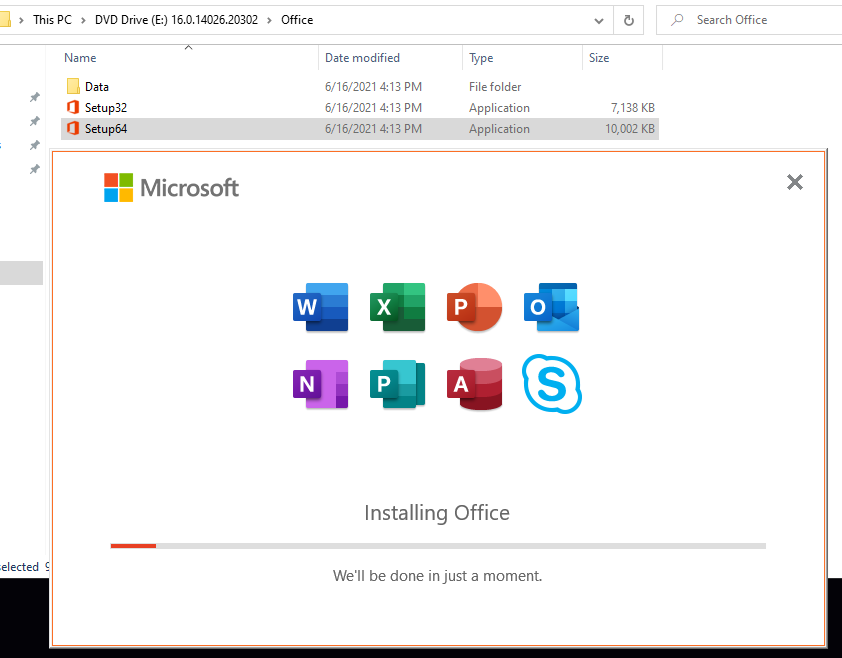

Please check if it is helpful to you.
This answer has been deleted due to a violation of our Code of Conduct. The answer was manually reported or identified through automated detection before action was taken. Please refer to our Code of Conduct for more information.
1 deleted commentComments have been turned off. Learn more
Leet me try once , ขอบคุณครับ